Higher Education CRM: Convert Every Inquiry Into an Enrolled Student
Maestro SIS includes built-in prospect management tools that help admissions teams organize incoming leads, assign agents to follow-up with them, and convert prospects to students — all within the same system, with no separate CRM platform or subscription required.
Managing Incoming Leads from First Contact to Enrollment
Maestro SIS helps admissions teams at learning institutions manage every step of the lead process — built for educational institutions without the complexity or cost of a standalone CRM platform.
Whether a lead comes from your website, a phone call, referral, recruitment event, or through a bulk import action, Maestro SIS gives your team one place to track the full prospect journey. Staff can assign agents, send messages, monitor follow-up, and convert qualified prospects into applicants without duplicate data entry.
Incoming Leads
Maestro SIS is designed to manage and organize leads once they express interest in your institution. It helps your team respond quickly, stay organized, and keep every prospect moving through the admissions process.
Agent Accountability
Every lead can be assigned to a specific admissions agent, giving each prospect a clear owner. Agents manage their own queues, while supervisors maintain visibility across the full admissions pipeline.
Lead to Applicant
When a prospect is ready to apply, convert them to an applicant in one step. Their information and message history carry over automatically — no re-entry required.
From First Inquiry to Enrolled Student
Maestro SIS gives your admissions team a clear, structured path for every incoming lead — from the moment they arrive to the day they enroll.
Lead Created
Incoming leads are captured and stored as individual records in Maestro SIS. Whether they came through your website inquiry form, a phone call, a referral, or a bulk import from a partner — every prospect can be accessed using multiple filter criteria associated to the lead info.
Agent is Assigned for Follow-Up
Each incoming lead can be manually or automatically assigned to a specific admissions agent. Agents see their own queue, and administrators can monitor workload distribution and activity across the team.
Agent Communicates with the Lead
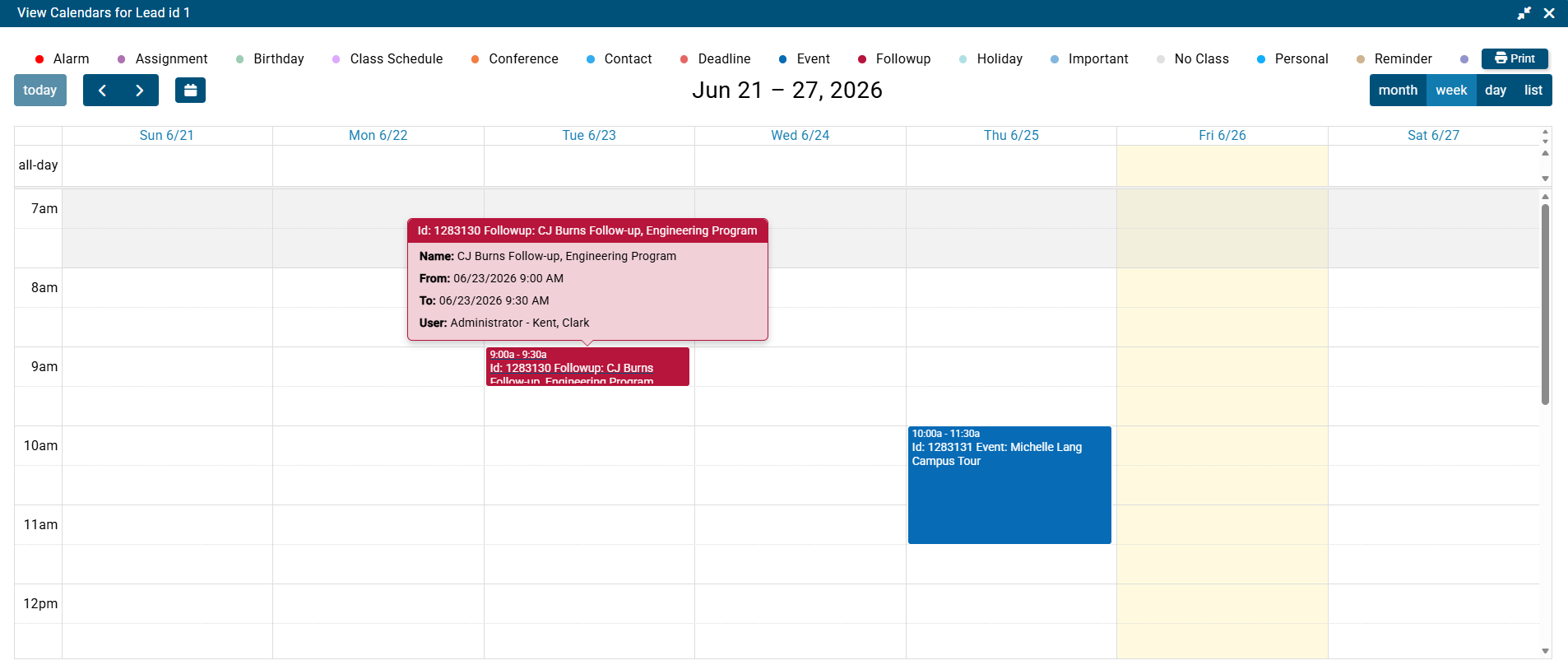
Admissions staff can communicate with prospects directly from the lead record. The full conversation history stays attached to the lead's profile, so any team member can pick up where another left off without losing context.
Lead Converts to Applicant
When a prospect is ready to apply, staff can convert the lead into an applicant record in a single step. Profile information, communications, and related history carry forward, reducing manual re-entry and handoffs between departments.
Applicant to Enrolled Student
With the click of a button, Maestro SIS creates a student record accessible to the registrar with an automated message informing the student and registrar of acceptance.
CRM Reporting & Enrollment Analytics
Lead Reporting & Analytics
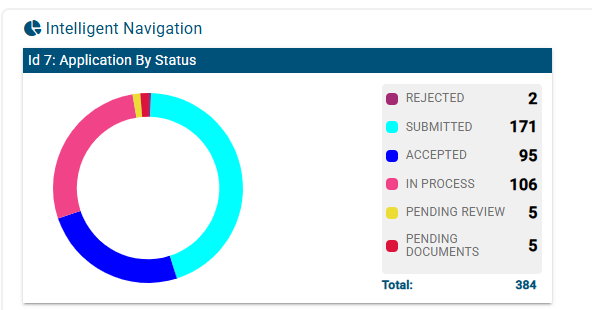
Lead data in Maestro SIS isn't just stored — it's useful. Use built-in reporting tools to understand inquiry volume by source or program, track how many leads are being contacted, monitor conversion rates, and evaluate agent activity. Give leadership the visibility they need to make enrollment decisions with confidence.
- Inquiry volume by source, program, and time period
- Lead-to-student conversion rate tracking
- Agent activity and follow-up rate reporting
- Feeds into Maestro's broader analytics dashboard

What Changes When Your CRM Lives in Your SIS
When prospect management is disconnected from your student information system, data gets duplicated, handoffs get dropped, and your team wastes time switching between platforms. With Maestro SIS, CRM tools are built into the same system — which changes everything.
No Data Silos
Admissions, enrollment, and academics share the same data. A lead that converts doesn't require manual re-entry anywhere.
Faster Follow-Up
Agent assignment means every lead has a clear owner from the moment they arrive. No gaps, no leads going cold.
Enrollment Visibility
Administrators see inquiry volume, agent performance, and conversion rates — without pulling data from multiple tools.
Connected to Every Module You Need
CRM & Prospect Management connects directly to the rest of Maestro SIS, giving your team a unified system from first inquiry to graduation.
Admissions & Enrollment →
Leads convert to enrolled students with all data intact — no re-entry required.
Communications →
Keep lead communication history connected to the student record after enrollment so staff can maintain full context.
Reporting & Analytics →
Lead data feeds enrollment reports, agent activity dashboards, and conversion analytics.
Frequently Asked Questions
How does Maestro SIS support our lead management process?
Maestro SIS supports your lead management process with a powerful built-in CRM designed to streamline every stage of engagement. It centralizes incoming inquiries from all channels, helping your team stay organized and responsive. With tools to assign leads, manage communications, track interactions, and monitor progress, Maestro enables a structured, efficient, and personalized approach — guiding each prospective student smoothly toward enrollment.
How can we add leads that don't come from our website?
Staff can add leads manually one at a time, or import a list in bulk from a spreadsheet. This makes it easy to bring in prospects from recruitment events, referral partner lists, phone inquiries, or any other offline channel — they all flow into the same pipeline inside Maestro SIS.
How does agent assignment work?
When a lead enters the system, an admissions agent is assigned to them as the primary point of contact for follow-up. Each agent can view and manage their own queue. Supervisors have a broader view showing all leads, their assigned agents, and current status of their tasks — so accountability is clear across the entire team.
What happens to the lead's data when they enroll?
Converting a lead to an enrolled student is a single action in Maestro SIS. Agents convert them to applicants and agent assignments carry over automatically into their student record once accepted. There is no manual re-entry and no data lost in the transition.
What kind of reporting is available for leads?
Maestro SIS lets you report on inquiry volume by source, program, and time period; track lead-to-student conversion rates; monitor how quickly agents are contacting leads; and identify where leads are dropping off in the pipeline. This data flows into Maestro's broader Reporting & Analytics module.
Is this CRM a separate product or included in Maestro SIS?
It's built directly into Maestro SIS — there's no separate login, no third-party integration to manage, and no additional license fee. Your admissions team works in the same platform as your academic and administrative staff, with prospect data flowing naturally into enrollment, course management, and reporting.
Ready to See It in Action?
Schedule a personalized demo and we'll walk you through the CRM module and how it fits into Maestro SIS as a whole.